You work hard to create blog content that people actually want to read. You know it’s an important part of your content marketing efforts that will bring in new customers over time.
But there are a few topics that online readers have seen time and time again—and at this point, they’re just becoming noise.
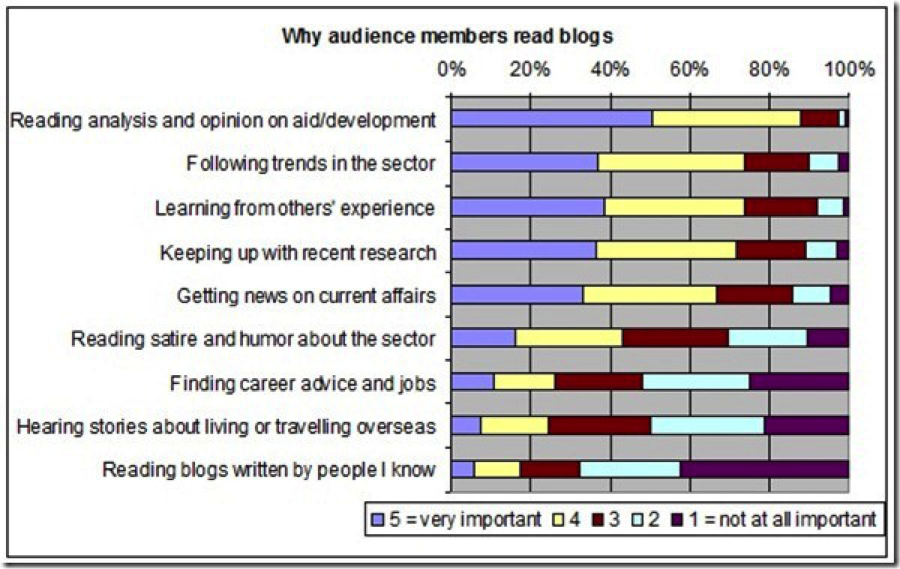
An Algoso survey found that 88% of people read blogs because they want analysis and opinions, while 74% wanted information on trends within a sector or to learn from others’ experiences.
In order to satisfy those readers’ driving desires, you need to write blog content that says something new, interesting, and insightful—not regurgitates what everyone else has already said.
Here are 5 topics that have been overdone (and that you should steer clear from.)
1. The 10 Best X
With more than 4.9 billion search results for this phrase, it’s safe to say that we’ve all seen our fair share of top 10 lists.
For example: The 10 Best Ways to Get More Followers on Twitter or The 10 Best Ways to Grow Your Email List
The trouble with these posts is that they strive for quantity—not quality—by providing only surface level information rather than taking a deep dive into one particular point.
When we look at a top 10 blog post, we don’t learn much beyond what they are. There’s often no how that explains what makes them qualified to be on this top 10 list or that walks you through how you could emulate what made it so successful.
Plus, research shows that the average content length for a top-ranking site in Google has at least 2,000 words. Therefore, it’s clear that Google defines higher quality content as posts that go into greater detail.
Unfortunately, the average top 10 post falls far short of that minimum. Bottom line: There’s not a lot you can teach in that few words.
Try this instead: Rather than throwing together a quick top 10 post, pick the best example on the list and pick apart what makes it work so well. Create a piece of content like ‘The One Best X to do X’ that teaches the reader something valuable using this singular example—and leave the rest of the top 10 list behind.
2. How X is Like X
Another overdone blog topic is the comparison post that finds some creative similarity between two concepts and trys to spin it into something interesting. There are 1 billion search results for this blog topic—so comparison posts have had a good run.
For example: How Your Business is Like a Computer Processor or How Your Marketing Funnel is Like Baking a Cake
It sounds like a good idea, but is there real substance for the reader that can come from such a far-fetched comparison? Is it going to teach them something they didn’t already know?
Posts that try to use comparisons to teach a concept often miss the mark because the writer is so focused on staying on track with the theme. The content becomes idea-centric rather than based in research, and while it might make for a clever headline, the content itself comes out weak.
The other obstacle that arises from posts that pivot on similarities between concepts or products is that they lack those essential personal opinions and experiences that offer unique insight—which the Algoso survey showed was a top motivator for blog readers.
Try this instead: Comparisons can be powerful when used to demonstrate a finding that others can implement, too. Try something like ‘What We Can Learn from Testing A Against B’ that shows how a test proved that one method was more effective than another.
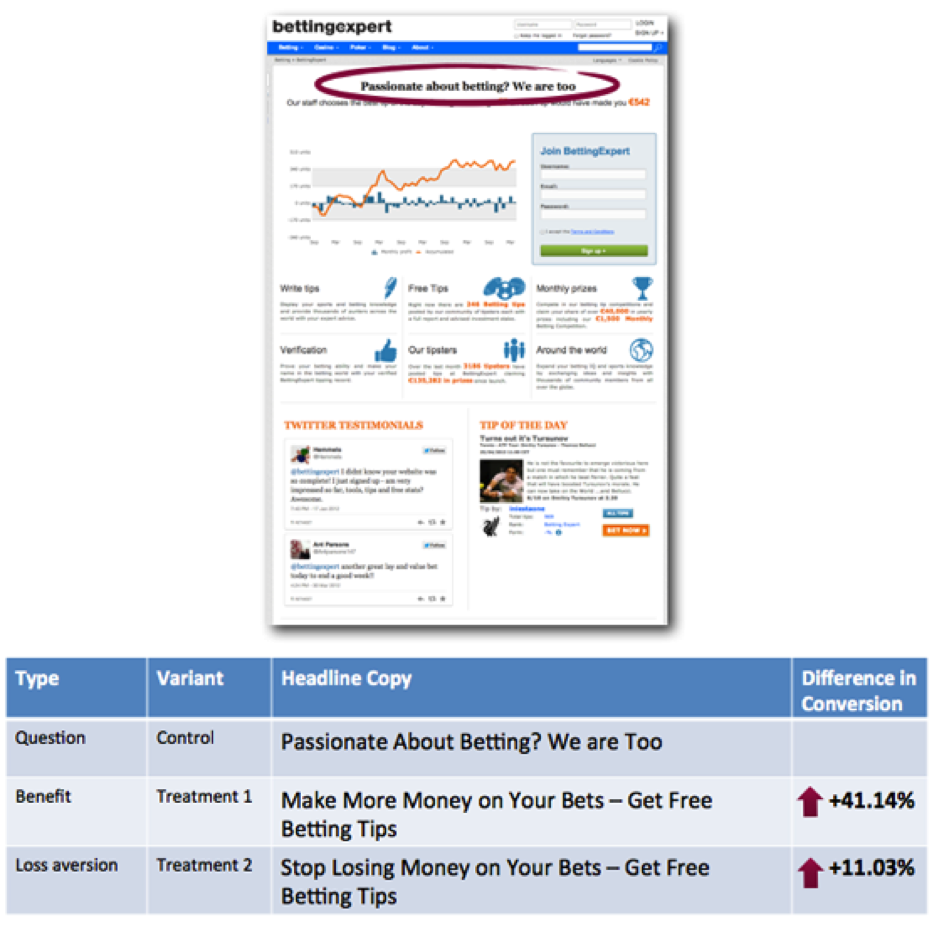
ContentVerve uses this to effectively showcase results of A/B testing and compares two versions side by side to illustrate the positive impact.
There are more than 350M search results for news round-ups, but how many of them offer something new to the conversation?
When it comes to these news round-up posts, they often just repeat information that’s already been shared elsewhere and leave out personal insight.
For example: Healthcare News Round-Up for August 2015 or Marketing News Round-Up: The Things You Missed
For the reader, there’s simply not much value. Number one: They may have already read the news elsewhere, so when they encounter it on your blog with no accompanying input, it feels disappointing. When someone visits your blog, they want to hear from you—not from someone else.
Number two: News round-ups also frequently include quote-heavy content that really tells the reader, “Hey, I didn’t have the story, but someone else did.” Is that a message you want to send to your readers?
Try this instead: Rather than just repackaging existing information, try a topic like ‘Highlights of X and What You Can Learn From It.’ This way, you’re still sharing the important information, but you’re doing the legwork for the reader and telling them what they need to read between the lines. Or, share what you know from your past experiences—and weigh in with some fresh perspective.
4. Why X is Cliché/Wrong/Bad
Lots of bloggers and content marketers like to take to the pulpit and express their opinions on business issues, launching lofty statements like, “X is wrong and here’s why.”
For example: Why Blogging is Bad for Your Business or Why Client Thank You Notes are Cliché
Don’t believe me? Check the 1B search results that come up for that title.
Opinion and persuasion are definitely key elements to a great blog post. However, when writers make these bold claims, they often forget to back them up with research, case studies, or experience. They’re purely opinion-based—and there’s where things get tricky.
Commentary that’s not backed in tangible proof can read as trivial for the audience, and can put you in a position to play defense with people who disagree. What might sound like an emotionally charged blog post that you’re really passionate about could actually do harm for your personal brand if you don’t have the ethos and logos to accompany your claims.
Additionally, these posts often lack a strong CTA for the reader. If blogging is part of your content marketing strategy and you throw in an opinion piece that’s missing a strong, relevant CTA, you can cause serious damage to your sales funnel.
Try this instead: Make bold claims by showcasing interesting case studies you conducted that include screenshots, testing methods, and real numbers that prove your point. Think more along the lines of ‘How We Tested (strategy) to Discover You Should Use A Over B’.
5. The Year in Review
999M ‘year in review’ posts exist already.
For example: The Year in Review: Looking Back at My Business in 2015 or Recap: The Year in Review and What I Accomplished
[Insert: GoogleResults.png]
Do we need another? Probably not. Here’s why:
Reflection posts that simply recap the past 365 days don’t typically offer the reader any new insight and instead just recycle ideas, lessons, and events you’ve already talked about.
More importantly, though, think about what motivates your audience to visit your blog in the first place. They might like your writing style and online persona, but really, they want to learn something they can use for themselves.
If you’re just looking back on what you accomplished this year and not showcasing an in-depth lesson you took away from it—you’re probably just rambling.
Try this instead: It’s okay to share what you learned over the past year, but remember to focus in on one key theme. A topic like ‘The Most Important X I Learned in (year) That Helped My Business’ gives the reader serious value—you’re squeezing the best lesson you learned over a the course of a whole year and handing it to them with a pretty bow.
Conclusion
With millions of pieces of content that already exist on the Internet, the blog posts you write need to stand out, provide value, and be backed in research—not pure opinion.
Gary Vaynerchuk said that when it comes to what you’re producing on the Internet, “Someone is always watching.” Readers can see when you’re not giving a solid effort to your blogs and each time you deliver less-than insightful blog posts, you chip away at the trust and authority you’ve earned with your audience.
Stop rehashing these overdone blog topics and start being a unique voice in the noisy world of content.
About the Author: Kaleigh Moore is a social media consultant and copywriter who helps SaaS companies craft intelligent content with a charming human element. Visit her website or follow her on Twitter.
"CMOs must overcome certain challenges in order to satisfy customers and shareholders. When navigated smartly, the path to mitigate these challenges is a very rewarding one."
The above excerpt from The CMO Dilemma: Bridging the Gap Between Love and Money - a study and corresponding eBook from Aberdeen Group, spells out in a nutshell the life of a CMO. On one hand there are the customers (love) and on the other are the boards of directors/shareholders (money).
The figure below highlights the fact that CMOs are under pressure to incorporate (and align) the expectations of both customers and shareholders with their activities to resolve the dilemma of keeping both equally happy and engaged. Not an easy balancing act to say the least but as you can see the benefits of doing so are many.
Ok that's the good news. CMOs who successfully bridge that gap and keep both parties happy, can live long and yes, prosper. There is no magic wand to wave and suddenly both your customers and board of directors are equally smitten with the work you've done as a CMO.
It is of course a challenge - the aforementioned challenge to satisfy customers and shareholders alike.
Don't Stop Believin'
Those who know me know I am a huge fan of infusing pop culture into my writing and since the key to achieving balance nirvana - meeting the needs of the customers AND board, has to do with journey management... see where I'm going?
Rest assured customer journey management is not a new concept, but the modern marketer needs to keep both the growing needs of customers and shareholders in mind. When executed effectively, journey management is a powerful activity that helps marketers attain the short-term and financial expectations of the shareholders, as well as meet and exceed the rapidly changing demands of customers.
It appears, however, many marketers still struggle mightily with customer journey mapping as 96% of CMOs reported they are not satisfied with their ability to use existing data when designing marketing programs to orchestrate buyer journeys.
That's why we created the Journey Management Benchmark Assessment tool, which was created specifically to evaluate how well CMOs are managing the balance between shareholders and customers to ensure their meeting the needs of both.
Be sure to take the assessment AND download The CMO Dilemma: Bridging the Gap Between Love and Money to find out how top performing CMOs are able to overcome this challenge by using journey management, omni-channel, and analytics as key ingredients of their activities.
What can I do to improve my yard? What can one do to make an awe-inspiring landscape for friends and family? Read this article to find the answers to those questions.
Consider native plants when making a landscaping plan. When you landscape your garden, try using trees flowers and shrubs that you would find locally. These native plants will flourish even in poor soil, they may not require as much water, and they are better able to survive in extreme weather conditions.
Creating a list of what you need before you start landscaping is a tip that everyone will need to think about doing. It is very frustrating to begin your project and then realize that you forgot something. Putting your work on hold to fetch a forgotten item is never fun.
Landscape design goes beyond plants and shrubs. Including wood, iron or cement structures in your landscaping design can add both substance and texture. Pergolas, decks, birdbaths and archways create attractive and complex looks with beauty and visual interest. These are usually available in many different prices so you can stay in budget.
Think about the existing structures around the landscaping project before starting on it. Look at where cables, sprinkler pipes, gutters, air conditioners, and other parts of your home are located so that your new landscaping does not interfere with them. If you have plans to dig in your yard, contact your county or city ahead of time to avoid damaging underground utility lines.
Next time you mow the lawn, consider leaving the cut grass where it falls. As the clippings decompose, their nutrients will seep back into the ground, rendering fertilizer unnecessary.
For some things, you can get the product that costs less. The cheaper versions of items like containers and mulch are just as good. You need to examine plants carefully before buying them, however. Places that offer discount plants might not actually take care of them like other places would.
When selecting your landscaping design, look to your neighbors for some inspiration. While there is nothing wrong with being creative when it comes to choosing your varieties of plants and trees, you never want your house to stick out like a sore thumb. Try to choose varieties that compliment the plants in your neighborhood, to add the most beauty to your house.
When planning out your landscape design, carefully consider the colors of the flowers, trees and grasses that you intend to use. You may discover that limiting your palette to only one or two colors has the greatest visual impact. Choosing too many contrasting colors may make your landscaping appear disheveled and wild.
When selecting trees for your landscaping project, look for those with rough, glossy or peeling bark. Birch, crepe myrtle, paperbark maple and Japanese cherry trees all have interesting bark that can add texture and visual appeal to your landscape design. Choose trees with bark colors that complement other aspects of your landscape, such as stones or flowers.
The information you've just read is filled with great advice that every homeowner should have. No matter what sort of project you have in mind (e.g. pool house, backyard redo, installing a pond, etc.) you're ready now having read these tips!
Ask any marketer, any writer, any reader, anyone. They’ll tell you: Article headlines are super important.
How important, really, are headlines? Experience, data, and history all point to the fact that headlines are the single most important component of an article, bar none. You’ve heard the statistics repeated ad nauseum — 80% read the headline, 20% read the article, ten seconds to gain someone’s attention, and all the other scary and data-driven statistics.
You know all this. More relevant to you is your own experience with headlines. Why are you even reading this paragraph right now, at this point in the space/time continuum of your mortal existence?
You were beckoned by the headline, formula-driven and hackneyed as it was, right?
Even though we’re Buzzfed up, Upworthyized, Viralnovaed, and Clickholed out of our minds, we can’t shake off this all-important reality: Headlines are freaking important.
In fact, the word “important” isn’t strong enough.
I’ve summed up the X ways that are guaranteed to turn you into a better headline writer. No matter who you are, what language you speak, or your final grade in composition class, you can develop white-hot skills in headline creation. Starting now.
Once you reach this level of awesome, you’ll reap the rewards in traffic, audience, readership, engagement, conversions, and, hey, even feeling really good about yourself.
1. Know Your Audience
I hate to lead off with a boring one, but it’s critical. You have to know your audience.
Let me give you an example to explain what I mean.
Look at this headline: “Neuropeptide Y—a novel brain peptide with structural similarities to peptide YY and pancreatic polypeptide.”
Is that not magnetic? Did it not capture your attention in two seconds? Will you not read the entirety of the article with rapt attention and owl-like eyes?
You might find this headline uncontrollably entrancing if you are a peptide researcher, are a neurobiologist, are K. Tatemoto, or have a side hustle researching pancreatic peptides.
This headline might just be the most electrifying headline in the whole world. Why? Because it could be exactly what some people are interested in. A good headline is relevant to the audience.
Get it? Okay, now, here’s another example: “He Thought He Just Found A Regular Fish, But When He Looked Closer, He Couldn’t Believe It.”
Is that appealing? Absolutely. It has a wider appeal than polypeptides, which is cool, because ViralNova isn’t concerned about targeting a narrow slice of the human population. They are concerned with getting as many eyeballs on their content as possible. Who wouldn’t want to find out about a guy who couldn’t believe it when he thought he just found a regular fish?
What is the difference between the peptide headline and the mind-blowing fish headline?
Audience.
It all comes down to audience. The Nature Science Journal has identified the audience that they want to attract (scientists), and ViralNova has identified the audience that they want to attract (warm bodies with a proclivity for clicking).
The right headline is only the right headline for the right audience. (Yes, I used the word “right” three times in that sentence, and I’m not apologizing.)
So, what’s the takeaway for you who desire to be a better headline writer?
Know your audience.
Once you figure it out who your audience is, really and deeply, and discover what they want, you can create the best headline for them. A good headline is only as good as it is relevant to your audience.
2. Practice
You only get better at something by doing it. A lot.
Talent is overrated. Practice is everything. It’s no different with writing headlines. You’ve got to do it again, and again, and again, and again to the power of 100.
Sims Wyeth, an Inc. contributor explains, “to get better at almost anything” you have to practice. That practice, deliberate practice to be precise, “consists of endless repetition and excruciating boredom.”
Did you get that? Endless repetition. Excruciating boredom. Getting better at headline writing is an attractive destination, but the path to get there is agonizing. You’re not going to love it. You’re going to loathe it.
Coschedule recommends writing at least 25 headlines per topic/article in order to come up with the best one. After you come up with 25, you eliminate over half, narrow it down to the best five, and poll your friends on the best of the survivors.
25 headlines is a lot of headlines. But it’s not just the number that is important. It’s the practice that goes into writing headline after headline after headline.
I’m skeptical of formula-driven headlines. How many “things you didn’t know,” and “7 ways” (oops), and “you’re doing it wrong” articles can a single human being take in during a single lifetime?
But here’s the thing. Headline formulas and patterns become formulas and patterns because of their proven past success. Even though you’ve already read eighteen “how-to” articles and nine list posts today, you’ll probably give in and read another six or so before 5pm.
One of the reasons why they work is because they are psychologically appealing (more on that later) and audience specific.
Let me show you one of Clark’s formulas as an example.
Formula: Here is a Method That is Helping [blank] to [blank]
The title here is ready to be tailored to a specific audience. Here are Clark’s three examples with my description of the intended audience.
Here is a Method That is Helping Homeowners Save Hundreds on Insurance Audience: Homeowners who want to save money
Here is a Method That is Helping Children Learn to Read Sooner Audience: Parents and child educators
Here is a Method That is Helping Bloggers Write Better Post Titles Audience: You
The formula-driven technique is only as effective as the titles are relevant to the audience. Go back to point number one and read it again if you’re not entirely clear on this concept.
If all else fails and you simply cannot come up with a good headline, use a formula. They’re like training wheels. The more you write, the better you’ll get. And then you can branch out on your own.
4. Split Test
Split testing is the key to unlocking the potential of your website. I test everything. Images, kerning, headlines, post length, social media frequency, load time, navigation changes — everything.
Why? Because split testing produces improvements.
If you aren’t split testing your headlines, you’re missing out on a major source of knowledge. The better you know how your headlines perform, the greater ability you possess to produce killer headlines.
Let’s say you produce a headline for an article, publish the article, and it gets shared and liked. Good. But what if you had written a different headline? Would it have gotten more shares and more likes? You won’t know unless you test.
In a study released by Unbounce, one website tested three headlines, leading them to discover the winning headline with a 41% boost in conversions.
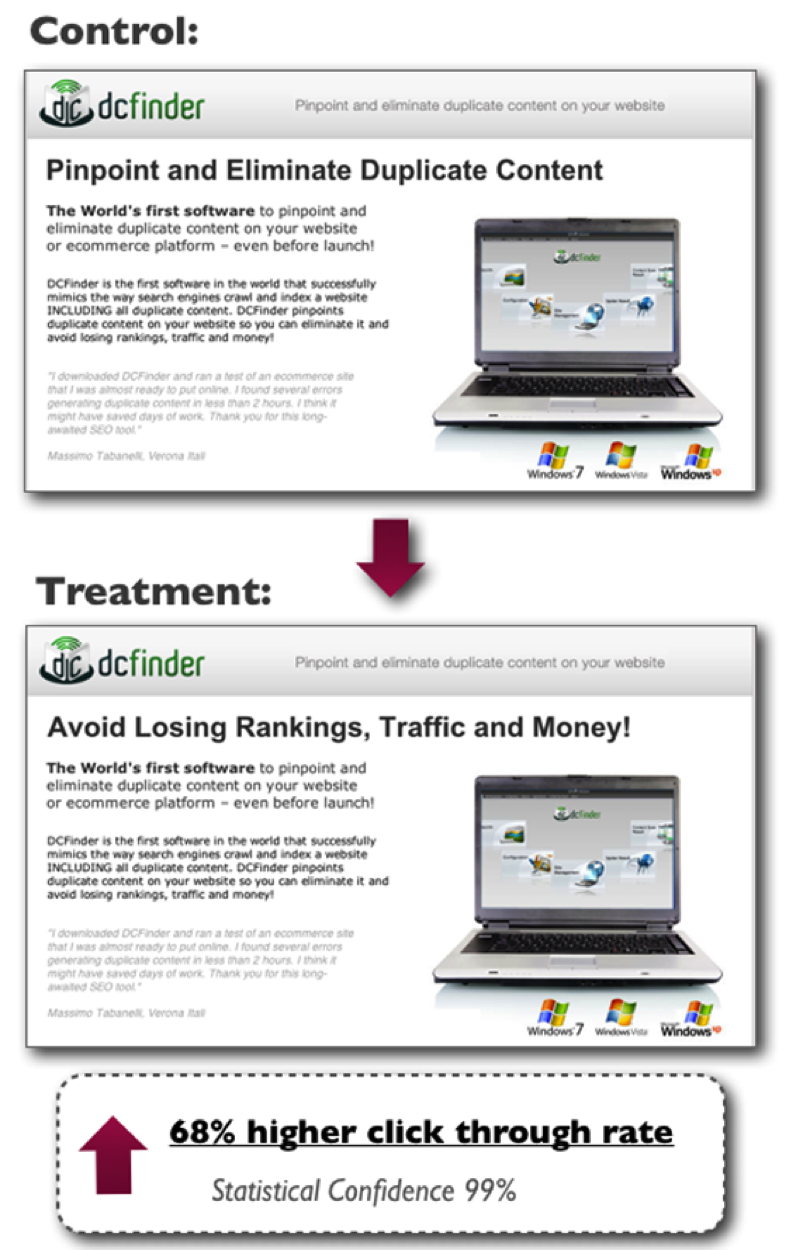
Another single headline change produced a 68% higher CTR.
Testing is a scientifically sound and rigorous method of determining the actual best headlines. By running these tests and uncovering the comparative success of your headlines, you can’t help but get better.
A less scientific way to test your headlines is with simple polls. When you come up with a series of headlines, send them to your colleagues and let them vote on which one they think is best. Although it’s not quite as sophisticated as running a split test, you’ll still be able to learn what best resonates with people.
By polling and testing, you overcome one of the greatest roadblocks to writing effective headlines: Your own flawed assumptions. Assumptions are like a rut. You get stuck in it, don’t know you’re in it, and your conversions and clickthroughs are dying as a result.
Kick yourself out of the rut with a little good old-fashioned testing, and you’ll race lightyears ahead in your headline creation skill.
5. Study Human Psychology
This final point sounds a bit weird, but it’s incredibly effective.
Human psychology is the study of the mind — how it works, how it is motivated, how it processes information, etc. By unlocking a few common thinking methods, cognitive biases, and tendencies, you will be able to learn powerful ways of writing headlines that people deeply crave on an elemental level.
For example, are you aware of the self-reference effect? According to the self-reference effect, the human mind interprets events and experiences in a different way if the information is related somehow to themselves. Memory works better when the information being remembered is related to the self.
When this mental effect is applied to headline creation, it lets us know that we need to relate the headlines to the audience. More specifically, the self-reference effect informs us that using the word “you” or equivalents in a headline may improve the memorability and attractiveness of a particular headline.
There’s no reason why issues like the self-reference effect should be locked away in volumes of peer-reviewed cognitive neuroscience medical journals. You should be using such knowledge to enhance your own article titles.
Conclusion
Becoming a better headline writer is the good life. When you can unleash great headlines with skill and ease, everything in online marketing gets better. Conversions. Engagement. Clickthroughs. Shares. Traffic.
It’s all there.
“Getting better,” however, isn’t an accident. It requires intentional and sometimes mind-numbing effort. Remember the whole “endless repetition and excruciating boredom” bit? Yeah, it’s going to feel like that sometimes.
Don’t stop. Success is in the offing. Let’s go make headlines that turn heads.
How have you improved your ability to write great headlines?
As an expert SEO, you have to be a jack-of-all-trades.
You need to understand link building, marketing, public relations, psychology, and technology.
At a certain point, there’s just not enough time in the day to do everything you’d like to do.
But you can save quite a bit of time and effort on small things by using browser extensions.
You can install them with one or two mouse clicks and access them with ease to the right of your address bar.
They will help you:
analyze website performance quickly
examine code behind websites
build links better
save time by improving your task efficiency
I’ve put together a list of 28 browser extensions I consider to be the best. I encourage you to give a few of them a try.
A quick heads-up: most of these extensions are for Chrome, but many also have a Firefox version. Only a few of them will work on less popular browsers such as Internet Explorer, Safari, or Opera.
Analyze websites and backlinks with the click of a button
SEOs have to analyze websites constantly.
The extensions in this section will give you a quick glance at the number of backlinks and social shares a page has as well as its basic on-page SEO.
1. Mozbar. Mozbar was the first of its kind. Even though there are now solid alternatives, the Mozbar remains a popular choice among SEOs.
You can use this extension in two main ways.
The first is when you search for a keyword in Google. It will display statistics below each search result:
You can quickly see the page authority (PA) and domain authority (DA) of the pages to assess the competition. You can also use the button beside the Google search bar to get a keyword difficulty score.
The second way in which you can use Mozbar is when you land on a web page. When you click on the Mozbar icon, you’ll see a bar pop up with the page’s overall stats.
Again, it gives you the PA and the DA scores as well as social sharing stats.
You can also dig deeper by clicking the magnifying glass icon on the left side of the bar, which will expand into a new panel.
In the panel, you can see the page’s:
meta text
alt text
headings
page speed load
markup
and more
You can see most of this with a free account, but if you want full access, you will need a PRO account with Moz.
It’s a beautiful and useful extension, but it has lost a lot of its popularity because it relies solely on Open Site Explorer (OSE) data. Compared to other leading link databases, OSE is smaller (contains less data) and updates slower.
2. Ahrefs SEO Toolbar. This is one of Mozbar’s competitors I mentioned. It is made to fulfill much of the same functionality but with data from the superior Ahrefs database instead.
When the bar is active on a page, it’s very thin at the top and shows you both link and social information of that specific URL as well as the overall domain stats.
You’ll find basic information such as:
backlinks and referring domains
Ahrefs URL rating and domain rating
social shares from the main networks
the same info for the root domain
All basic features are free, but if you have an Ahrefs subscription, you can dig deeper.
When you click the down arrow in the top left corner, a panel with more information will expand. You’ll be able to see a graph for the recent backlink growth (or decline) to the page or domain. There is also a handy link to go to the actual Ahrefs site explorer if you’d like to take a closer look.
Finally, you can also activate the plugin when you search for something on Google. You’ll get a small information-packed bar under each URL:
It shows linking and social data for both the URL and domain.
3. Majestic SEO Toolbar. This is the other main competitor of Mozbar. Again, it has all the essential features of an SEO toolbar.
When you activate it on a web page, you can see the:
number of links
number of root domains
trust flow and citation flow
link profile chart
and more
All the information is drawn from the Majestic SEO database, of course. The information in the main “summary” tab is free. If you’d like to use the other tabs, such as the detailed backlink analysis or anchor text, you’ll need a paid account.
The only potential problem is that, unlike the other SEO extensions here, it does not analyze search results. So if you’re looking for a quick keyword competitor analysis, one of the other tools might be a better option.
4. SEO & Website Analysis by WooRank. This plugin is one of the best all-in-one SEO plugins. The three extensions we’ve looked at so far all focused on backlinks and page authority, but this extension is more focused on on-page SEO and technical aspects.
Click its icon while you’re on a page, and a panel will pop out of the left side. Let it run for about 20-30 seconds (depends on the page):
The first thing you’ll notice is an overall score out of 100. This indicates how many of the basic best practices the page follows.
The real power of this extension is in the small tabs along the top. Each tab will give you different information about the page and site:
basic SEO: title tags and meta information
mobile optimization: a mobile friendly score and previews on different devices
usability: page load metrics and how easy it is to access content
technology: what plugins and CMS are being used
social: basic social sharing statistics
visitors: estimate of traffic level
The great thing about this toolbar is that almost all of this information is free. There are a few advanced options that require a premium account.
When you’re on a page, just click the extension icon, and it’ll quickly test all the links to see if they’re working.
Working links are highlighted in green, while the broken ones will be highlighted in red with the error code beside them.
The only thing that could be improved here is having a shortcut to quickly copy the URLs and anchor text of the broken links, which could then be pasted into an email or spreadsheet. Still, this is the best broken link checker I’ve used.
6. Domain Hunter Plus. This extension can also be used to identify broken links. However, it was made for a very specific purpose: to find expired domains that already have backlinks and authority.
It’s very simple to use. Go to a high authority page with a lot of links, and click on the extension’s icon to scan the page. It will find all the broken links on the page and show them to you in its little panel.
The cool thing is that it also shows you how many links are pointing to the broken URL as well as how many links point to the domain. Finally, it shows you if the domain is available to register.
If you’re looking to pick up a cheap domain that already has some decent authority, spend a few hours with Google and this extension, and you can probably find what you’re looking for.
7. SEO Quake. Some SEOs don’t want an extension associated with a premium link tool or need something a little more customizable.
SEO Quake is a little more basic than other extensions, but it still gives you the essentials. It’s also one of the few available for all major browsers (including Opera and Safari).
It is designed, just like Mozbar and Ahrefs, to work with search engine result pages (SERPs). With it, when you search for something on Google, you’ll get a bar beneath each result.
It gives you quick estimates of the number of links to the page and domain, page age, alexa rank, and links to whois info. One really cool feature is the ability to save the SERP data and results as a CSV file (spreadsheet).
When you use the extension on a web page (other than a search engine), it will open up a new tab with the results. It’s not pretty, but it does contain:
basic meta information
basic social shares
keyword density
backlink information
Be aware that the link data comes from publicly reported Google and Bing/Yahoo links, which aren’t necessarily the most up-to-date or accurate.
Finally, I mentioned that you could customize this extension. It’s possible to add your own parameters if you need non-standard metrics and are not afraid to learn a bit about regular expressions.
8. Meta SEO Inspector. This extension is extremely basic but clearly shows you the meta information of a page. When you click the icon, you’ll get something like this:
The information includes the basic meta tags (title, description, keywords) and open graph tags (important for social media), and it highlights if any important ones are missing.
Most SEOs won’t need this very often, but it might be nice to have if you find yourself needing to find and copy down meta information once in a while.
9. NoDofollow (Firefox) or NoFollow (Chrome). These two extensions aren’t made by the same creator, but they are the leading options for this function for the corresponding browsers. As their names suggest, when the extensions are active, they identify all links as “dofollow” or “nofollow.”
With NoDofollow (pictured above), the good links (dofollow) are highlighted in blue, while nofollow links are highlighted in red.
There may be some value in having nofollow links in your link profile, but typically you want to focus your effort and resources on obtaining high quality dofollow links.
Here is when these tools would be useful: (1) when you’re trying to decide if you should comment on a site or (2) if you’re wondering if links from a new social media site have any SEO value. A quick click of the button gives you an easy answer.
Extract useful information from the web
When it comes to SEO research, most is done on the web. Instead of wasting your time doing everything manually, use the extensions in this section to speed things up.
10. Scraper. If you’re an SEO, chances are that you need to copy down links and written content from pages on a fairly regular basis. Scraper is designed to work on most pages.
When you come across a chart or table you’d like to scrape, you can highlight a few cells/rows and then right-click on the selection and choose “scrape similar.” The tool will find data in the rest of the table, giving you the ability to open it as a spreadsheet.
Watch this short video to see how it works:
One final note about Scraper is that it isn’t going to work 100% of the time. It’s designed to be lightweight and intuitive, which means that it sacrifices the complexity to make it robust enough to handle all situations.
That being said, I think you’ll find it useful in a large percentage of the situations that need a quick scrape.
11. Link Grabber. The first thing you’ll notice about Link Grabber is that it’s extremely fast. When you have a web page open and click the icon, a new tab will open almost immediately with a complete list of links.
These links are clickable, and you could also copy/paste them into a spreadsheet:
Unfortunately, there’s no option to see only external links. If you’d like to only see those, right-click the icon and click on options. Then, you can add the domain you’re on to the blocked domains list so that it won’t show up. It’s not the most elegant solution, but it will work in a pinch.
This plugin is useful if you’re trying to quickly collect a list of sites that a particular domain links to. You can analyze the results together in a spreadsheet to find the most popular linked-to sites and see if you can devise a strategy to get links too.
Additionally, sometimes you just need a quick link count or want to examine the internal linking of a site.
Find out what lies beneath the surface of a web page
Remember that Google doesn’t see what we see when we’re surfing the web—its bots see code. Not all code is visible on a web page itself. SEOs need to be able understand the basics of HTML, CSS, and even Javascript.
These extensions will help you find out what’s behind a particular page.
12. Firebug. This extension is a must for any SEO or developer using Firefox. It allows you to right-click on an element of a page to see its HTML and CSS.
Additionally, you can edit the HTML/CSS to see what the page would look like with different parameters. Developers can use Firebug to debug websites, but SEOs typically don’t need to worry about that.
There’s no way I can show you all the features of the tool in this post, so watch this quick video if this sounds like something you could use:
Chrome has a pretty great built-in code inspector already. However, if you like Firebug on Firefox, there’s also a lite version of it for Chrome. It can do almost everything the Firefox version can minus Javascript debugging and a few other features.
13. User Agent Switcher. Your website’s visitors use all sorts of browsers, devices, and software. In many cases, certain visitors have trouble seeing your website as intended.
If you’re a smart SEO, you’ll dig into your analytics every once in a while to see if a certain subset of users has abnormally poor user metrics (high bounce rate, low time on page, etc.).
Unless you own 20 different phones, laptops, and tablets, it isn’t easy to investigate the issue.
With this extension, you can set your browser to tell any website that it’s a specific browser, device, or operating system. You can even pretend to be a search engine spider.
So when you have a problem with low conversion or poor engagement, you can find the cause and then use User Agent Switcher to confirm that you’ve fixed the issue.
14. Browsec. Depending on the sites you work on, your site may display different content to users in different countries. Alternatively, you may want to access some content that you can’t from your country’s IP address.
Browsec is a simple free VPN that allows you to spoof your IP address and makes websites think you’re located somewhere else. The free version of Browsec has a limited set of options but good enough for most situations:
15. Wappalyzer. I love finding a new tool that helps improve conversion rate or engagement before it gets too popular. One of the best sources of new tools is other websites you frequently visit.
If you visit a website one day and see a new plugin, widget, or other feature that you love, chances are that it’s a WordPress plugin. Sometimes there will be a label on it, but not always.
You can use Wappalyzer to find a ton of information about a website, including:
widgets being used
the operating system
any special fonts
web server information
frameworks
Just click the extension icon, and you’ll get a list within seconds.
16. Page load time. Having a fast-loading website is essential not just for search engine rankings but also for marketing in general. If your visitors can’t load a page quickly, more often than not, they’ll leave.
This extension is very simple. It shows how long it took you to load a page in your browser toolbar.
You can expand the results to see a more detailed breakdown:
You can see if any redirects are taking too long to load or if your server response time is too long, among other things. You can use this to see if you need a content delivery network (CDN) or a faster host.
17. Redirect Path Checker. Redirects are an important part of the Internet. As pages and sites get updated or transfer ownership, redirects can ensure that backlink authority is passed through and that visitors can still find you.
This extension will show you all the redirects from the URL you entered to your final URL:
This simple extension can come in handy in a number of ways.
For example, if you’re analyzing your competition, it’s important that you know exactly what you’re up against. You can search for a page in Google and filter out all new results so that any links to that page from these results link to the original URL (if it’s different from the present one).
You can then use the plugin to follow the redirect chain and then find all the backlinks pointing to each URL along the way.
Additionally, you can use this to find any redirect problems you’re having with your own site.
18. Ghostery. This extension tracks all scripts on a page and shows them to you in an attractive little pop-out panel (when clicked).
First, this tells you which widgets, plugins, and other scripts (like advertising networks) are being used on the page.
Additionally, you can block any of these scripts with the click of a button. If you’re running a lot of scripts on your website, this tool can let you test the effect they have on page speed as well as the appearance of your website to visitors.
Stay up-to-date with minimal effort
Many parts of your job as an SEO require you to stay up-to-date. Whether it’s information about SEO, your niche, or social media activities, there are extensions that can help.
I’ve collected them here for you.
19. Mozcast. Here’s another extension from Moz. It quickly shows you what the current Mozcast is in a little bubble on your browser’s toolbar. This can alert you to any big shifts in the SERPs so that you can look into any issues.
If you visit the Mozcast website regularly, you may prefer to use this extension instead to save time. When you click it, a pop-out will show you a graph of the temperatures for the last 30 days.
20. Buffer. Buffer is an amazing tool for scheduling social media sharing. You can set it to share a certain number of posts per day at specific times automatically.
This extension allows you to add posts to share to your personal queue. Instead of having to go back to the main Buffer site, you can just click this extension icon when you come across something worth sharing and add it to your queue:
The share will automatically be populated with your current URL and its title, but you can change it if you need to.
Another great feature of this plugin is that it adds a little Share Image button to the bottom right of all pictures.
Including images in social media shares typically increases your engagement rate. When you click this button, it brings up the same pop-up as before, but it also includes the image you picked.
21. Pocket. In a field such as SEO, you always have to stay up-to-date if you want to be seen as competent. That means you have to read a ton of content on a regular basis.
Pocket allows you to save articles, images, and videos for later. By using this extension, you can quickly “put content into your pocket.”
Note that you can install Pocket on just about any operating system or device. That means you can save content from your computer and read it later on your mobile device when you have free time.
Be a more efficient and effective SEO
Who doesn’t want to free up some time?
These extensions will help you complete common SEO tasks faster and better.
22. Evernote Web Clipper. Evernote is primarily a note-taking software, but it has since become well known for its image editing software Skitch. Skitch lets you quickly annotate images, and it’s a tool I often use to annotate images for blog posts.
This web clipper extension is essentially Skitch for your browser. You can select a full screenshot, an email, or a full page of content or select a specific part of a webpage.
It will open your selection in a new tab and let you edit it before saving it to your Evernote account:
While there are only a few options for editing and annotating, it’s all you need 95% of the time.
23. TechSmith Snagit. If you’re not a fan of Evernote for some reason, no worries—I have you covered.
Snagit is a very similar tool, and in some ways, it’s even a bit better (and a bit worse in others).
I use it sometimes to create images for blog posts, so I don’t think you can go wrong with either option. Snagit is often a bit quicker just because you can download an image directly after editing it instead of going to your notebook and downloading it.
Once you make your selection, it will appear in a new tab so that you can edit it:
It has a few different options when it comes to shape and color, but it doesn’t have the advanced tools such as the marker, blurring, or highlighting.
24. Bit.ly. A big part of your job as an SEO revolves around links. Bit.ly is arguably the most popular link shortener service. It lets you shorten URLs quickly, and it even lets you track stats such as the number of clicks a link got.
Another cool feature is that if you enter a URL to shorten it, if someone has already done it with Bit.ly, you can see how many people clicked it in the past.
When you click this extension icon, it will automatically give you a shortened URL to use. You can also share it directly from the pop-up with your social profiles:
25. LastPass. How many accounts do you have on different websites? For most SEOs, it’s a ridiculous number.
Instead of having messy and unsecured spreadsheets or text files of user names and passwords, you can use LastPass.
It lets you save user names, passwords, and notes for any site you visit, and it will automatically fill them in (securely) when you come back in the future.
Instead of trying to remember 1,394,293 (or however many) passwords, you only need to remember one password for your LastPass account. You can access your data from any computer/device.
Here’s a brief overview of the free tool:
I only talked about convenience, but this is good for security too. You won’t need to reuse passwords since you can create a strong unique password for every account you own.
26. Momentum. If you find yourself getting off track during the day, Momentum could be a useful extension for you. It works by creating a custom “new tab” screen that you see every time you open a new tab.
First and foremost, Momentum shows you your main goal for the day. It also lets you create a handy to-do list.
In addition, the backgrounds are gorgeous, and you can see your local weather as well.
It’s a nifty little tool to brighten up your day and keep you focused.
27. ShareMetric. If you don’t want to use a full SEO bar like I showed you earlier but you still need to know how a specific page has performed on social media, you can use this extension.
When you click the icon, this tool will show you any page’s stats for all major social networks:
Facebook
Twitter
LinkedIn
Google+
Reddit
StumbleUpon
Pinterest
In addition, it shows you some basic SEO stats. It includes both Open Site Explorer and Ahrefs stats for URL and domain rank as well as linking root domains to the page.
28. iMacros. Automation is a powerful thing. It’s how blackhat and greyhat SEOs dominated search engine results for years. Now that Google has caught up, automated link building has died out for the most part. However, that doesn’t mean that automation can’t help you in other aspects of SEO.
If you’re doing anything on a daily or weekly basis and it’s the exact same procedure every time, it can be automated.
The power of automation is that even if it’s a small task, saving a few minutes on a regular basis will save you hours of time by the end of the year.
iMacros features full-fledged paid versions, but its extensions are free and good enough for most basic SEO tasks.
Here’s an overview of how the iMacros extension works:
Yes, this is a fairly technical thing to learn, but it’s worth it in the long run. Plus, most SEOs that I’ve talked to find it kind of fun.
I’ve shown you 28 browser extensions that can make any SEO’s life easier.
I doubt you need them all, but I hope you found at least a few extensions that will help you in the future.
While many of them have a learning curve, I recommend trying them out for a week at a time to find out which ones are really useful to you.
I know that I’ve probably missed some great extensions—don’t yell at me! Instead, leave me a comment below and let me know which extension(s) is your favorite.