What's the first thing you think of when you hear the number 65? Like many of you I'm sure I think of social security, medicare and so on. Or perhaps you thought of an athlete who wore or currently wears that number? In terms of the literal meaning of the number itself, according to one source "the number 65 is a compilation of the vibrations and energies of the number 6 and number 5. Number 6 lends its attributes of stability and grace, acquisition, love of home and family, protection, care and nurturing, reliability and responsibility, integrity and honesty. And number 5 adds its vibrations of major life changes, motivation and progress, learning lessons through experience, free-will and personal freedom, making important life choices."
Now I don't know how much stock I put into all this - feel free to debate it amongst yourselves. However, those "important life choices" most assuredly come into play when we're talking about the number 65 and chief marketing officers of the world - both the B2B as well as the B2C variety.
Let's Start With the B2B CMO Side First.
In an article this past February, McKinsey released some findings of research they had conducted regarding the B2B buyer and their path to purchase. The article's subtitle said it all and should come as no surprise to any B2B CMO: "B2B purchasing decisions increasingly trace complex journeys, challenging the long-standing practices of many sales organizations."
In other words the B2B buyer's path to purchase is an integrated one - just as is the case with a consumer on the B2C side. I'll get into the B2C side a little later.
Include in the article was one particular finding and without further ado, I give you Exhibit A when it comes to Integrated Marketing, the Number 65 and Why it is so Significant for Every CMO.
"Our research shows that, on average, a B2B customer will regularly use six different interaction channels throughout the decision journey, and almost 65 percent will come away from it frustrated by inconsistent experiences."
This finding should be screaming off the page at a B2B CMO/head of marketing. Anytime you see words like "frustrated" and "inconsistent experiences" it's not a good thing - not by a long shot. One reason why as to we see words and phrases like these may very well have to do with the content these B2B customers are receiving.
In a piece on Business 2 Community entitled Effective B2B Marketing Requires an Integrated Approach, the author makes a very notable point when it comes to content. "The effectiveness of your website, social media, email, marketing automation, videos, blog, white papers, webinars, etc. all hinge on having the right kind of content. No matter how powerful any one channel may be, it’s only as good as the content you create for it.
Ok B2C CMOs, It's Your Turn
For Exhibit B, I'm going to cut right to chase here for the B2C CMOs of the world: "65% Of Marketers Are Not Giving Consumers What They Want."
That is the title of an article I wrote for Forbes last year. And while the findings of the research I referenced then may be a year old, it has no bearing whatsoever on this discussion for, if anything, that number (65%) may be even higher today.
Here's an excerpt of that article:
Everyone knows of the infamous acronym that is K.I.S.S. — Keep It Simple, Stupid. Perhaps there are other variations I am not aware of but the meaning and intent and context remain the same: Don’t over complicate things but rather keep it simple.
Remember that while reading the following two excerpts, courtesy of InternetRetailer.com and MultiChannelMerchant.com, respectively:
“35% of e-commerce executives plan to invest in creating a ‘seamless shopping experience’ across stores, web and mobile…”
“Study Shows Consumers Want Seamless Shopping Experience. The study found that 89% of consumers said it was important for retailers to let them shop for products in the way that is convenient for them, no matter which sales channel they choose.”
***
You'll notice I threw in another number, 89%. Obviously I did that for a reason to show the juxtaposition between what marketing leaders are doing/planning on doing vs. what consumers, AKA their customers, want.
Why?
To me the obvious question is Why?
Why would a CMO, be they of the B2B or B2C variety not provide the person on the other end of that line, what they want, when they want it on the channel(s) they want it?
Could it be these same CMOs are not using the right technology or marketing platforms? Could it be these same CMOs are not even aware that such technologies and platforms even exist?
Well as luck and fate would have it, earlier this year, we partnered with The CMO Club on The CMO Solution Guide to Leveraging New Technology and Marketing Platforms. If you are a CMO and either or both of the above scenarios apply to you - you will want to download this Guide today.
The guide contains results of a survey of over 100 marketing leaders plus the five key solutions we identified to help CMOs and marketing leaders tackle the challenge of providing a seamless customer experience across all marketing channels via the use of technology - the right technology that is.
You’ve likely heard this. Especially if you run a SaaS company.
I’ll admit Display Advertising can be a tough nut to crack. It can take a bit longer to achieve a positive ROI depending on the length of your product’s buying cycle. Yet, Display advertising CAN work for B2B SaaS businesses. Many well-known SaaS companies already use Display to drive leads and sales. A few examples are Intuit, Zendesk, and Salesforce.
However, you don’t need to be a big start up like Dropbox with a huge ad budget. You just need to dial in your targeting, consistently A/B test and follow a proven advertising strategy.
This post outlines the 5 key components to designing an effective Display advertising campaign.
Step #1: Find the best traffic sources – Ad Networks
The first step is getting qualified prospects to your landing pages. SaaS companies need high-quality sources of traffic. They tend to target a more sophisticated audience made up of business owners and decision makers. You won’t find many “affiliate” traffic sources that cater to this audience.
Here are the 4 most used networks by SaaS businesses.
Google Display Network
The Google Display Network on Google Adwords should be your starting point. No network has the quality of traffic or the ability to scale that Google has. This is why most B2B advertisers use Google as their main traffic source. There is, however, one downside to Google: they’re extremely strict with what they’ll allow you to say in your ads and have on your landing pages. Everything will need to be 100% transparent. You’ll need to back all claims up with legitimate evidence. You’ll need to clearly explain your offer. You’ll need to have a privacy policy and make it clear how you handle user privacy. Most B2B SaaS companies won’t have issues with this, but it’s worth mentioning.
BingAds
BingAds is the 2nd to Google in traffic volume. Like Google, their publishers are also going to be of higher quality. The downside to BingAds is they have fewer publishers when compared to Google, making it harder to scale your campaigns. However, Bing is a great addition when you’ve already got your Google campaigns up and running.
Native Ad Networks (Outbrain and Taboola)
Native Ad Networks are the latest and greatest ad networks at the moment. They serve the “Recommended” and “Around the Web” ads you see on large publishers like Huffington Post, Business Insider and Forbes. Ads served by Native Ad Networks look like recommended content and news stories. This means the landing pages and creatives advertisers use tend to be in a different format. A few large SaaS advertisers (like Salesforce) use Native Ad Networks to drive traffic to blog posts or white papers.
Native Ad Network ads being served on Forbes.com
Prospects read the content and can opt-in to receive more information. This is a great, non “salesy” way to move prospects into your sales funnel. Some of the largest Native Ad Networks are Outbrain, Taboola, Content.Ad and rev:content.
Direct Buys
A Direct Buy is when an advertiser bypasses ad networks and ad exchanges and buys inventory directly from a publisher. This gives you the ability to negotiate prices. You can often get a much better deal with a Direct Buy than on an exchange or network.
Step #2: Find your best customers – Publishers
A “publisher” is the website that you buy ad inventory from. For example, Huffington Post is a publisher. This is one of the most important components and one of the number one reasons why people fail with display advertising. It goes without saying that you need to get your message in front of the right audience.
You’d never sell steaks at a vegan food festival. Yet a lot of advertisers try to sell their enterprise software to prospects on celebrity gossip sites. It sounds crazy, but I see it all the time.
Industry Dependent
The first place to begin when choosing publishers is to select websites with content related to your product.
Let’s use Quickbooks accounting software as an example. Quickbooks wants to target small business owners, accountants, or anyone who is going to do the books for small businesses. Intuit (the company who created Quickbooks) buys traffic on sites like accountingweb.com and journalofaccountancy.com. Both sites contain content related to accounting. People browsing these sites will have accounting on the brain. They’ll be more receptive to an ad about accounting software.
Example of a Quickbooks ad on AccountingWeb.com
Another example is Yahoo! advertising on Search Engine Land (a website targeted at SEM and SEO professionals) for their webcast. Search Engine Land’s audience will be interested in a webcast that teaches how to write better ad copy.
User Demographic and Mindset
One of the keys to success — and best ways to scale — is to not just target sites based on their content. There are only going to be so many accounting and SEM websites out there. You’ll soon run out of options for converting publishers. However, there are hundreds of news, political and general interest sites out there.
This is where it helps to know the demographic and psychographics of your prospects. There are likely certain political, religious and general interest sites that people who might be interested in your software regularly browse. For example, someone who is republican or democrat might be more likely to be an accountant, small business owner or SEM manager. You’d then want to target sites where these people hang out.
How do you find these sites?
This is where competitive intelligence comes in. You’ll want to browse — or use competitive intelligence software — and find sites that might be relevant to your target market. Take note of who advertises on these publishers. Are you repeatedly seeing ads from other SaaS companies or even general B2B business offers? Then you know this might be a good publisher for your company as well. Keep track of these specific publishers in an excel file. Also take screenshots of their ad creatives. You’ll want to create a “swipe file” with ad creatives that work for other B2B businesses.
Common Publisher Categories For SaaS Businesses
Most SaaS businesses end up selling to other SaaS businesses. This means there are a few common publishers categories that work well for most SaaS advertisers.
Tech News – Business owners and decision makers want to stay on the pulse of what’s going on in the tech industry. The best place to reach them is through tech news websites. Some of the most common include Mashable.com, VentureBeat.com and TheNextWeb.com.
SEO/SEM News Sites – Business owners and employees who might use your SaaS tool are likely going to be on internet marketing websites. Specifically, SEO and SEM. You’ll see a lot of SaaS and small internet businesses advertising on publishers like Search Engine Land, Marketing Land and Search Engine Journal.
Job Sites – Businesses are always looking for a few good men and women. It might be a bit harder to drill down to target only business owners (and not unemployed job seekers) but many SaaS businesses advertise here. One advantage to job sites is that companies with enough cash to hire new employees probably have enough cash to afford your product. A few popular publishers in this space include jobs2careers.com and Monster.com.
General Business News Sites – Similar to tech news, anyone interested in business might read sites like Business Insider, Business.com, Fortune and Forbes. These publishers are a great place to test out the Native Ad Networks we talked about in step #1.
Step #3: Get them to click your ads – Ad Creatives
The ad creative serves the purpose of cutting through the clutter and picking your prospects out from the crowd. Most B2B SaaS companies will be best served by using straightforward offers in most of their ad creatives. This selects only the most serious customers on a given publisher.
Most B2B SaaS companies rely on two different ad creative + landing page combinations:
The Free Trial Offer and the “Ethical Bribe”.
Free Trial Offer
A simple concept: the user can sign-up for a free trial of your software. It’s can work, but it’s not always the best route to take. Why? Take a look at the usage statistics of your free trial users. The majority login once and then never again.
Examples of Free Trial ads:
Ethical Bribe
You’re unlikely to get many sales or even free trial leads from Display or any other advertising channel. People are going to be hesitant about committing their time or money to anything they’re unsure about. You’ll need to educate them on how your specific solution can solve their problems. You can also show them how other companies have used your solution to solve their issues.
The way to do this is to offer an “ethical bribe”. An ethical bribe usually comes in the form of a white paper, guide or case study. The idea is to present your product in a way that convinces a prospect to at least give it their attention. Most advertisers force users to opt-in with a valid email address (and sometimes phone number) in order to download the ethical bribe. This allows the advertiser to pitch them through email marketing or even call them.
Ensighten creates software to help businesses manage their websites more effectively. This ad leads to an opt-in page to receive their free report, “How Enterprise Data and Tag Management Will Boost Conversions & Revenue Beyond Your Expectations”
The “ethical bribe” is more commonly used than the free trial offer. Most SaaS products require more customer education in order for the prospect to see the value of their software and even consider giving it a test run.
Ad Creative Formula
The best way to design higher converting ad creative is not to reinvent the wheel. The best strategy is to analyze the ad creatives of other SaaS companies (competitors and non-competitors) and “copy” their successful template. You can be sure that a specific “formula” is working well if it’s being used over and over again.
Here’s a basic formula you can follow. It might not be the optimal design for your specific product, but it will do the job 90% of the time.
Company Colors – Most companies tend to use the colors that are shown on their landing page/logo. This helps the prospect begin to associate those specific colors with your brand. For example, the green in the Quickbooks ad above captures your eye and you begin to associate that color with Quickbooks (green is a great color for them because it’s also the color of money).
Company Logo – SaaS advertisers also tend to use their logo within the ads to further the effort of brand recognition.
Product image – Besides the logo, they usually show screenshots of the software being used on a monitor or phone. This instantly signals that they’re going to be led to a page all about a specific piece of software. If you’re doing lead generation with a white paper or guide, you can even put together a picture of an eBook cover or a PDF. Anything that makes it transparent what the user will receive when they click through tends to work very well.
Benefit Driven Copy – Your copy should be benefit driven. You don’t want to list out what technical features your product includes. You want to list out the benefits your prospects receives by clicking through and signing up for a free trial or by downloading your ethical bribe.
Call-To-Action Button – No need to get fancy here. All you need to do is tell them what they’ll receive after they click your ad. A simple “Download Your Free Guide” is often all you’re going to need. Buttons in your ad creative tend to work well because people are used to clicking on them. They see a button and they immediately know it’s meant to be clicked. Avoid using just simple text unless you find a way to make it stand out.
Here are a few different ads that follow the above guidelines quite well:
Step #4: Get them to convert – Landing Pages
The success of your Display campaigns has less to do with your ad creative, and more to with what happens after the click.
You can have the best copy. The best images. And the highest quality traffic. Yet, if your landing page isn’t designed for conversions… say goodbye to positive ROI.
The good part about landing pages for SaaS businesses is that simplicity seems to reign supreme here. You won’t need a fancy video sales letter or long-form sales page to get people to convert. You can just follow the formula of what the most successful SaaS Display advertisers are doing.
Ethical Bribe Landing Pages
These landing pages follow up on your offer of some sort of “ethical bribe” in exchange for your prospect’s contact info. These pages tend to be pretty simple and focused on one goal, which is getting their email address. Also a great way to cookie someone for retargeting for a webinar, more free content, free trial or a direct sale.
Example: Tableau
“Ethical bribe” landing page used by Tableau.
Tableau is data visualization and business intelligence software.
A large graphic right below the header with a headline that calls out what the prospect will get if they opt-in to receive the ethical bribe. In this case that comes in the form of a white paper that gives you five of the best practices for creating an effective dashboard. Below the call-to-action there is a bit more text, which explains what is contained in the whitepaper and why you should download it. Further down the page there is a short testimonial and a brief overview of what Tableau software does.
Free Trial Landing Pages
Offer your prospects a free trial to test out your software. This requires a different style of landing page, albeit very simple to design. Even though the trial is free, you’ll still have to get them excited enough about your product to actually use their free trial, because most people don’t.
Example: Kissmetrics
One landing page Kissmetrics has tested out to get free trial sign-ups.
Most free trial landing pages (like the Kissmetrics page above) include a few paragraphs of info about the product and what it does. These landing pages usually include the free trial sign-up for directly on the page. Very rarely will an advertiser make their prospect click through to another page to sign-up for a free trial.
So now you’ve got your traffic, your ad creatives and your optimized landing pages. But what happens if the people that come to your site don’t convert? Step #5 could be the most important part of your Display funnel, so read on.
Step #5: Didn’t convert? Follow-up with them.
The vast majority of people who see your landing page will neither sign-up for a free trial, opt-in or directly purchase your product, EVEN if you do steps 1-4 perfectly.
However, not all is lost. There is a way to follow-up with prospects who have already seen your page. This is called “retargeting”. It works like this: a user hits your page and is tagged with a piece of code (called a cookie). That cookie allows you to follow them around and serve them ads on other websites. Some people call them “stalker ads”. It might seem a bit creepy, but it works.
Retargeting works because people are busy. They might want your product, but something might have distracted at the moment of purchase/sign-up and now they’ve moved on. People need to be constantly reminded.
Retargeting is especially important for SaaS businesses with long sales cycles and high price points. Since the user has already seen your site and is familiar with your brand, most SaaS companies hit them with a free trial during their retargeting campaigns, not the initial campaigns.
Example: Optimizely
Retargeting ad creatives lean more towards being “branding” style ads. The prospect has already seen your site and has some familiarity with your brand. You don’t necessarily need to state what you do. You just need to give them a quick reminder of what your software is about (in this case “The #1 Website Optimization Tool”). Most retargeting ad creatives follow the simple formula of having a large headline, the brand’s logo and a big call-to-action.
“Branding” style remarketing ad. Shows the logo, basic text and a large call-to-action
As mentioned in the previous section, MuleSoft sends most cold traffic to a lead generation page where they can download a white paper. Once they’ve downloaded the white paper and are sold on the benefits of using MuleSoft in their business, they’re more likely to sign-up for a free trial.
Optimizely uses a simple free trial landing page that gives the user no other option but to test it out
Although the example of Optimizely is very basic, you can get things advanced very quickly with retargeting. You can show different offers, messages and opt-in opportunities depending on how long it’s been since they’ve visited the page. You can show different messaging to users who hit specific pages (e.g. someone who looks at your “tour” page might receive a different message than someone who just looks at the home page).
All of that is quite advanced and goes beyond the scope of this beginner post. But trust me when I tell you that retargeting is very powerful tool that ALL businesses should be using.
Conclusion
While the strategies in this post will get you started, I can’t emphasize enough that the key to seeing success with paid advertising is patience. Things will often not work on the first go. That’s okay. The key is to do your competitive intelligence and see what other companies are doing successfully and then test that out. Testing and patience are two of the most important aspects of Display, bar none. But trust me when I tell you that the sky is the limit when you get paid advertising converting. It’s one of the best ways to get a steady stream of customers and I highly recommend that any business take advantage of this amazing channel.
About the Author: Mike is the Founder of Adbeat, an advertising intelligence tool that will help you find your competitor’s advertising strategy at a glance on 100,000+ websites – view competitors winning ad copy, best website placements, and landing pages. Learn more about digital media strategy on the Adbeat blog.
Karan Thakkar (@geekykaran) is not a marketer. He is a coder.
That gives him a unique perspective on marketing, especially since his first foray into marketing rightly earned him the title of amateur “growth hacker.”
Growth hacking is a way to grow a business/website/social profile as fast as possible with the least effort possible. It usually involves coding.
Karan considers himself a growth hacker because he used simple tactics and a few programming scripts to grow his Twitter following from 300 to 5,000 in three weeks as documented on Medium.com.
When I read the article on Medium, I immediately wanted to interview him to see if I could get any additional behind-the-scenes information on his Twitter growth strategies. Across a series of questions I sent him via email, he gave me a few gems on the specific tactics he used, and how he was able to hack the Twitter growth process.
1. Can you give us a quick idea of your background and why you wanted to grow your Twitter followers?
I am a part of the front end team at Crowdfire [a social media and content platform] … The reason why I wanted to grow my twitter audience/outreach was majorly because of a competition we had within the company called “Crowdfire Twitter Premier League.”
2. Can you give us an overview of the specific tactics you used?
Sure. So we had three rounds with different goals. To sum up the strategy I used per round:
a. Maximize follower gain
For this I first figured out influencers, blogs and brands that tweeted content that I was most interested in. Then I used my follow script to follow their latest followers. I did not just use up my follow limit on one accounts’ followers but spread it over multiple accounts. This ensured that the people I was following were active.
b. Maximize engagement per tweet
The first thing I had to do was find good content. Best source was Medium. I searched for interesting content related to marketing, social media, growth hacking. Then I used Buffer to schedule this content. Based on the analytics of each tweet, I decided which piece needed to be rescheduled for bringing in maximum engagement.
c. Maximize engagement per follower
For this, I built a script that would monitor a list of accounts that posted great content, after which I tweeted the same content from my account.
3. Is there an easy way for someone who is a marketer with very little coding experience to implement your scripts? If so, can you describe it here?
Yes, absolutely! You can use this link to understand how to open the Chrome Developer tools. Once you’ve done that, just copy and paste the scripts that I have mentioned in my post. As for the script that I used in the last round, it is not so straightforward to set up if you don’t have prior coding experience. But I’d be happy to help anyone who needs to set it up.
4. Have you had any backlash from Twitter with your growth tactics?
No. Apart from the painful rate limits everyday during the competition — none. However, I do advise everyone to use all of these tactics judiciously.
5. Out of all the tactics you shared, which one drove the most “high quality” follower growth?
Over a period of three weeks, the statistics made me realize that I gained approximately 33% of the followers purely from pushing out great content. So while I would say that following more people is a great way to increase your followers, you should not underestimate the power of good content.
6. If you could do the contest all over again, what would you do differently to further blow everyone out of the water?
While most of my ideas were already used for this contest, there is one trick that I have found quite rewarding at times: The probability of getting a follow back from someone increases if they see a lot of activity by you on their tweets (in terms of favorites/retweets).
So I go to a person’s profile and favorite some of their interesting tweets. Then I follow them, leading to a higher chance for a follow back. This theory is based on the The Reciprocity Principle: “Start by giving before taking, and people will reciprocate.” Unfortunately, there is no way to automate this. Yet.
7. What tangible benefits have you seen as a result of your Twitter growth?
One that particularly blew my mind was being approached by the founder of a popular online gaming firm to join their Growth Team (and possibly head the team). Other than that, I was also contacted on LinkedIn by a couple of startup founders. Also, a lot of people reached out on Twitter [and] email, requesting me to help them set up certain scripts on their machine. Some of them were ready to pay for the setup.
8. What was the most interesting thing you learned from the contest experience?
Before the competition, I never [thought] that social media or marketing would ever interest me. Mostly because I thought I would not be good at it. The contest, however, helped me discover a different side of myself — the little marketer bug that I don’t usually use. I just had to explore it a little more. After all, like Andrew Chen says, “Growth hackers are a hybrid of a marketer and a coder.”
In my opinion, you should do both even though most people focus on the first option.
Those bloggers don’t realize they’re losing a large chunk of their traffic before it even has a chance to convert.
One of the best ways to see how well you’re using your traffic is to look at your bounce rate.
The average bounce rate across all industries is about 45%. Bounce rates just for blogs are usually higher as illustrated in the image above.
But that’s just the average. Some sites have bounce rates in the 20s, while others have bounce rates in the 80s.
If 4 out of 5 visitors leave your site immediately, there’s a problem—likely multiple problems.
Compare that to a 20% bounce rate (1 in 5 visitors leaving without interacting). This lower bounce rate means that you would only need a quarter of the traffic of the other site to get the same engagement results.
There are many ways to improve your bounce rate, but in this article, I want to show you an underutilized way of reducing your website’s bounce rate and increasing all aspects of engagement.
The main problem is that you need visitors to take action to reduce your bounce rate. But people are notoriously passive on the Internet.
The 1% rule states that only 1% of forum users will actually post on a forum, while the rest will passively lurk:
We see the same kind of behavior on blogs, where typically about one visitor out of 100 will comment (depends on subject and article).
In fact, people behave like this in many settings, especially on the web:
News consumption is actually really passive, unless there’s some sort of virus going online, because it’s just whatever appeals to you in the fishbowl.” – Choire Sicha, The Awl
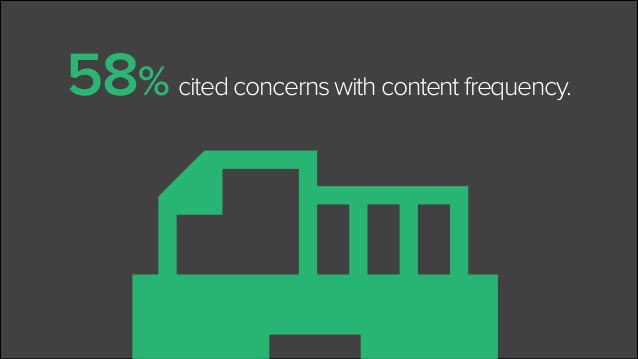
And it’s this behavior that marketers struggle to change. According to one survey, 58% of B2B marketers struggle to produce engaging content:
The reason why they struggle so much is that the Internet is a very different medium than other forms of entertainment, and most marketers are stuck in mentality of the past.
People have always consumed news passively on TV, but they had no choice in most cases other than to watch a show or even a commercial. With the Internet, there are always 100 other sites just a click away.
If you want engagement, you need to create an engrossing experience for your visitors. That sounds hard, doesn’t it?
It can be hard, but I’m about to show you how you can easily use interactive content to make your content much more engaging. If you put the tactics in this article into action, you can probably drop your bounce rate by 10-15% in most cases, or even more.
The psychology and science behind interactive content
Engagement and interactive content go hand in hand, and we’ve known it for quite a while.
Interactive education was originally studied at home and schools even before the Internet was a thing.
Let me define interactive education: Interactive education is teaching that requires participation from students.
Interactive content, as we’ll soon see, is the same thing—just swap out students for readers.
At first, researchers found that interactive teaching was effective at engaging students who were raised in hyper-stimulated environments. Hyper-stimulated environments? Does that sound like something else you know? (Hint: the Internet).
The reason that interactive teaching was studied in the first place is because the researchers determined that it led to higher engagement levels. To take it further, studies showed that higher levels of engagement led to deep learning.
Deep learning means that you’re actually understanding concepts and can use that knowledge later. Surface learning means that you’re just memorizing facts to pass a test.
Anyone who has ever studied for a test knows that surface learning doesn’t last. As soon as you finish writing the test—whoosh—that information evaporates from your brain.
When it comes to your blog posts, you want your visitors to gain a deep understanding of the topics you write about. For one, this makes you and your website more memorable. More importantly, your visitors will actually be able to apply this information and make their lives better. Guess with whom they’ll associate those benefits? That’s right—you.
Other studies of high school and university students have confirmed that interactive-engagement methods lead to better grades and retention.
One study looked at how clickers (those multiple-choice polling remotes) given to students and used during class affected students. It was found that frequent use led to deeper learning. I’ll be showing you soon how to use similar polls to boost engagement in your posts.
But interactive learning goes far beyond quizzes and polls. Studies have found that other types of interactive learning deepens learning just as much or more:
creating case studies
doing experiments
student research
team learning
Do you know what’s even more interesting? Games can be a form of interactive learning, and they work well.
Let’s get to the results, however, because that’s what you’re probably wondering about. A recent study on university students found that professors who use interactive teaching methods had double the engagement rate of other professors and had a 20% higher attendance rate.
Having a higher attendance rate in class corresponds directly to having your blog subscribers read your articles more often. Wouldn’t you want a 20% boost in your email update click-through rate?
Teaching on the web is finally being implemented, and it’s catching up with traditional interactive learning. But bloggers and marketers are adopting it slowly, so you have a chance to get ahead of the curve.
One example is Codecademy. Every lesson involves you learning a programming technique by completing a task. It is incredibly engaging and effective at teaching beginner programmers:
The reason leading blogs are sold on interactive content
Like I said, blogs are playing catch-up here, but some have already recognized the potential of interactive content.
The Internet is a bit weird because users actively choose what content they’ll consume, but most of that content is set up for passive consumption.
This is why visitors don’t get as much from your content as they should and why very few ever take action.
You need to create a situation where your visitors both actively choose to read your content and also actively consume it, meaning they take some kind of action.
We’ve talked about the main benefits: your readers will learn more, and you’ll become more memorable.
That alone should be sufficient motivation, but there’s actually more to it.
You can use interactive content to learn about your readers.
For example, if you embed a tweet somewhere in your content, you can see which of your readers not only read that far into your posts but also liked it enough to share it. These are your best readers.
In addition, if you take some sort of a poll, you can use the results to learn more about what your audience thinks.
Or what about a short pop quiz? See if the majority of your audience understands what you’re teaching. If they’re not, how could it possibly help them? It gives you a chance to refine and improve your writing.
That’s enough about why you should be using interactive content. Now I’m going to show you 7 different ways to implement it on your website.
1. Social media is for lazy busy people
People love to share content as long as it doesn’t take much effort.
Every day, over 500 million tweets are being created. They are a maximum of 140 characters and don’t take much effort.
The more you can remove friction by integrating sharing functions with your content, the higher your engagement rates will be.
At first, there were browser plugins that made it so that you didn’t even have to visit the social network to share something.
After that, came share widgets, which are still pretty effective.
But sharing widgets are still a bit disconnected from the content and require people to both choose which social network they want to share the content on and craft a description.
But there’s a way to erase the border between content and sharing to make it extremely easy for readers to share: embedded social media.
Look at this embedded tweet on a Crazy Egg blog post:
It actually improves the look of the content. In addition, it’s at an appropriate point in the content, and readers can tweet the pre-filled message with one click.
I’m going to show you how to embed social media content from the biggest social media networks. However, if you use a smaller network heavily, there is probably a way to embed that content as well if you dig around a bit.
How to embed tweets
The simplest way to do it is to use Twitter’s embed function. This is a perfect way to showcase your tweet. It allows readers to follow you or engage with that particular tweet without leaving your website.
To start with, find the tweet you want to share. Click on the “…” button.
Once you click “Embed Tweet,” a pop-up will give you the embed code. Copy the HTML, and paste it on your website. Once you do, it will show up in your article like this:
The drawback of that method is that you’re limited to one tweet. What I prefer to do is use a plugin like TweetDis (which we use on Crazy Egg) to create beautiful custom tweets.
You can create any message and use the plugin to highlight it. A reader can then click on it to tweet it. I like to include a relevant username (e.g., @neilpatel) in the message so that I can track them.
You can also create multiple tweetable bits throughout your article.
Once you have the plugin installed, highlight some text in your article that you would like to use as a tweet, and click the icon in the text editor bar:
A window will pop up with your options:
Under the “Add” dropdown menu, pick which kind of embedded tweet you want. A “Box” will give you a full box like I showed you at the start of this section. In addition, you can also pick a “Hint,” which highlights the full sentence instead:
How to embed Facebook posts
For niches dominated by Facebook, embedding a post can get you extra comments, likes, and shares.
I haven’t found a good plugin for WordPress, so you’ll have to stick with the default method that Facebook gives you.
Find a post that you’d like to embed, then click the little down arrow in the top right corner:
Once you click the embed option, a window will pop up that gives you the HTML code you need to embed the post.
Once you put that code on your site, this is what it will look like to your visitors:
They can like, comment, or share the post, and they can also like your page without leaving your site.
You’ll notice that this procedure is very similar to embedding content from Twitter on your site. In fact, almost all social networks are the same, so just look for an embed option in a dropdown menu on a post on any other network you’re interested in.
2. Pop quiz time
Quizzes are one of the oldest forms of interactive content, right up there with simple calculators.
While some marketers may feel that quizzes have been overdone, they still work really well.
In a study of 100 million articles in 2013-2014, it was found that eight out of the top 10 most popular pieces of content were quizzes.
Not only do people like quizzes, they also love to share them to show their friends who they are, what they care about, and, of course, how cool they are.
Coding a quiz from scratch would be fairly time consuming, but there are many quiz tools you can use.
For example, you can use Qzzr to design a quiz, which will give you an HTML code to copy and paste in your article—that’s it.
Here’s what the backend looks like:
You have a ton of options: you can create text or image answers for each question. Your quiz can have as many questions as you like.
Once you’ve set all your questions and results, you’ll get an embed code to paste on your site. Then it will look something like this to the visitor (“Which Iron Man armor suit are you?”):
To make it even easier for many of you, there are also quiz plugins for WordPress such as SlickQuiz, which is also free.
You can make the quizzes right in your admin panel:
You won’t have quite as many options, but you can still get started with testing your quizzes. When you’re done, you just use a shortcode to embed the quiz on your site:
Once your visitor completes the quiz with either tool, they will see their result and have a chance to share it on popular social networks such as Facebook and Twitter.
Now, Iron Man suits are fun but not very useful from a teaching perspective, which is what you want.
I recommend putting quizzes in the middle or near the end of the post, and using them to test your readers’ knowledge. It’s a great opportunity to reinforce a key teaching point.
Secondly, make the question and result useful. Don’t ask a basic or irrelevant question. Ask something that will force your reader to think about and apply the information in your article.
For example, let me ask you a question. Which one of these would be the most appropriate question if I were to include a quiz right now?
Is interactive content good?
Which of the following is not a benefit of using interactive content in blog posts? (multiple choice answer)
Is Iron Man cool?
Question 1 is too basic—you could answer it just based on the title of this post.
Question 3 is irrelevant to the overall teaching points.
Question 2, however, forces you to think about what engagement leads to. The sample answers might be:
more return visitors
more comments
better search rankings
higher time spent on page
If you’ve read and understood everything up to this point, you’d be able to figure out that “better search rankings” is not a benefit of using interactive content.
3. How to lower your form abandonment rate
At one point or another, I am sure, you’ve filled out a long form, clicked “submit,” and then gotten an error saying you missed something. What’s worse is when you have to re-enter your data.
Most forms are terrible. They fulfill the basic functional requirements and nothing else.
That’s why I really liked Typeform when I first came across it.
This tool allows you to create highly customized forms. You can ask questions or request information and incorporate all sorts of form elements. They look great and function perfectly.
Additionally, you can create forms that are engaging because you can insert them in the middle of a sentence.
Put all these features together, and you get highly interactive content whether it’s on your blog or somewhere else on your website.
Over the course of a month, Typeform records 5 million form submissions with a completion rate of 59%. In comparison, other form tools get between 3% and 28% completion rate.
Let’s look at how you can create a form.
Start by creating an account and clicking on the “create new form” button.
You can either start from scratch or choose one of the many templates:
Once you’re inside, drag and drop different elements to your form. You can include text, questions, scales, pictures, or ask for answers from your visitor.
Your next step is to pick a design and some simple settings. Once you embed it on your site, your visitors will see something like this:
As as bonus, you can even use Typeform to make quizzes if you didn’t like the other options I gave you earlier:
4. Make your content fun with polls
Polls are highly related to quizzes.
You ask a question, typically with a few definite answers, and results are tallied based on input by visitors.
Polls are great when you’re trying to find out what your audience cares about or thinks about a specific topic.
The most attractive poll tool I’ve seen is ContentTools Poll. What your visitors will see is a simple poll, and when they click on an answer, they will see the results and buttons to share the results:
It is a paid tool, but you can start with a free trial.
Alternatively, there are many other poll tools out there. Two of the most popular options (both work with WordPress) are PollDaddy and Wedgies.
Almost all of them work the same. You simply type in your question and answers, and drop whichever elements you’d like into place:
After you do that, you’ll just need to copy and paste the HTML code to your website, or use the shortcode that the WordPress plugin gives you.
When your visitor clicks on an answer, they’ll see the results and share buttons as expected.
There are lots of options to create polls—that’s the easy part. The harder part is using them effectively.
Don’t just create polls for the sake of engagement. Create them so that you can learn about your audience.
For example, I could create a poll for this post that would ask you which type of interactive content you are most likely to use on your website. Based on your most popular answers, I could create further content. If 77% chose quizzes, I would create a step-by-step guide to creating quizzes. Alternatively, I could write an in-depth post about the psychology behind quizzes and engagement.
You could also use the answers to monetize your site. Once you learn which topics your audience is most interested in, you can create products around those topics.
5. Which is better: long or short content?
If you’ve ever been to Quick Sprout before, you’d notice that I like long content.
Writing longer content helps get extra search traffic, but more importantly, it allows me to go into great detail on a particular topic and include lots of examples.
It works for me, but it doesn’t work for everyone. In fact, the top two reasons why people don’t read content are related to content being too long:
Even some of my readers complain that my posts are too long sometimes.
If you want to give your readers more control over your content, you can use hypotext. Essentially, you create links in your content, but instead of opening a new window or tab, they open a hidden section in your content.
Hypotext allows you to hide extra information that only a portion of your readers might want.
When that text is compressed or hidden, only essential text will be visible on the page.
Here’s what happens when someone clicks a hypotext link:
A section expands just below the paragraph of the link clicked with all the content that you’ve hidden. You can hide:
detailed explanations
more examples
more research
pictures
The other bonus, in addition to giving readers more control, is that it also engages them. They decide for themselves if they want to learn more or explore the content deeper.
If you want to try hypotext, start by installing this WordPress plugin.
Then, when writing your article, wrap the text you want to serve as the link with shortcodes, e.g,:
[hypotext target=”your-target-id”]your link text[/hypotext]
Then, wrap another shortcode around the text you want to be hidden:
Make sure that the target name and id name are the same, or it won’t work.
6. Take infographics to a whole new level
Another type of content I love is infographics. They can still be used to drive over 60,000 visitors per year to your website.
I’m not the only one who likes them. Just under 80% of marketers use and share infographics sometimes or frequently.
Infographics are great, but there are two minor problems with them. First, they’ve saturated the web. Even high quality infographics don’t produce the results they used to. Secondly, they aren’t engaging. Infographics are typically skimmed, and then some viewers might share them or leave a comment.
But what if you could make infographics into a story that involved user interaction?
It shows the number of small businesses each state has. When you move the mouse across the picture of the United States, different states are highlighted, and their stats come to life.
In addition, the “home” page of the interactive infographic allows you to choose what you’re most interested in. The first option takes you to the map, but there are several other interactive screens you can choose.
This type of infographic forces people to read and explore rather than scan. I shouldn’t really use the word “force” because most people will find this fun.
People love videos because it’s just like watching TV.
The problem, as we’ve seen, is that passive viewers don’t take nearly enough action.
If you use video ads or incorporate videos in your content, you might want to think about making them interactive to improve engagement.
Most of us are familiar with those “choose your own adventure” books we read as kids—they were fun. You had a choice of two pages at the end of each page to customize your story as you saw fit.
Similarly, you can let your viewers choose their own adventure.
In a Philips video (the shaving company), there’s a short intro of a guy who had a wild night that, he says, “started with shaving.” You get to pick the style of his facial hair at the beginning of the night and see a different video depending on your choice.
For a product video, you could let your viewers choose which aspect of the product they care about (features, manufacturing, company background, etc.).
If you have a video editor (an actual human), he or she will probably already know how to create a video like this. For regular marketers, it’s not exactly easy. You’ll need to use a tool such as Vidzor or Rapt Media to create videos like the example above.
One simple option is to simply use YouTube annotations. You can use these to let viewers navigate to other videos. Sure, it won’t be as fancy as a professional option, but it’s a good way to test if you’d like to start creating interactive videos in the future.
Here is a complete tutorial on creating annotations on YouTube videos:
Your viewers should see clickable annotations pop up on the video at specified times:
It’s up to you where those annotations direct them to.
Conclusion
Interactive content is a huge opportunity that’s still in its infancy. If you ever wished you discovered something before everyone else adopted it, this is it.
You probably noticed that not all types of interactive content is easy to create. I don’t recommend you try to create all of the types at the same time. Pick one or two that fit well with your audience and website, and focus on perfecting those.
What you should see, once you start creating interactive content your readers are interested in, is a much lower bounce rate, higher time on page, and a significant bump in the number of shares and comments you get.
Now, I have a challenge for you: pick one type of interactive content, and brainstorm a few different ways you could create content for your website with it. Then leave me a comment below, letting me know how you plan to use interactive content in your content strategy.